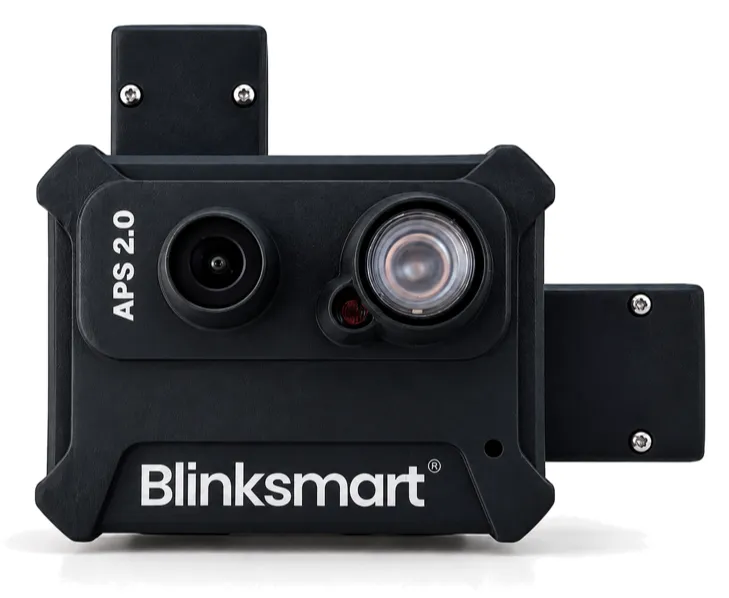
Blinksmart APS 2.0
An accident prevention system that watches the driver, sounds an alarm in the cab and reports every Critical moment to your fleet dashboard.
What it does
Real-time drowsiness detection
Spots microsleep and repeated eye closure the moment it happens.
Distraction monitoring
Flags a driver looking down or away from the road.
Instant in-cab alarm
A loud beep in the cab wakes the driver before the vehicle drifts.
AI on the device
Detection runs in the cab, so the alarm works without mobile signal.
Fits in one visit
Plug-and-play retrofit, tested against a 9-point checklist on every vehicle.
Fleet dashboard
Live location, trips, event images, driver recognition and driver scores.
Only five alerts are Critical.
A safety system that rings all night gets ignored by the second week. Blinksmart sounds the control-room alarm for five events. Everything else waits for the morning review.
Critical: act now
- Repeated sleeping or looking downSame vehicle, 5 times in a rolling 15 minutesCall the driver now and ask them to stop and rest.
- NoFaceThe camera cannot see the driver's faceCall the driver to clear or straighten the camera.
- Device inactive, 12 hoursNo data from the device for 12 hoursCheck whether the vehicle moved; if it did, check power, modem and SIM.
- Device inactive, 24 hoursNo data from the device for 24 hoursRun the power, modem and SIM checks, then call support.
- Device inactive, 48 hoursNo data from the device for 48 hoursRaise a support request with the device ID.
Warnings: review and coach
- Sleeping, single eventOne sleep eventReview the event image and coach the driver.
- YawningAn early sign of fatigueCheck in with the driver at the next break.
- OverspeedingAbove the set speed limitReview the trip and coach the driver.
- Extreme overspeedingWell above the set speed limitReview the trip and coach the driver.
- Rash drivingHarsh or erratic drivingReview the trip and coach the driver.
One dashboard, from the whole fleet down to one moment.
Monitor at fleet level, then open a vehicle, driver, trip or event only when something needs you.
Total, running and idle vehicles, plus every alert across the fleet.
- Total vehicles
- 48
- Running
- 31
- Idle
- 17
- Critical alerts today
- 2
One vehicle's trips, live location, alerts and current driver.
- Vehicle
- KA 01 AB 1234
- Status
- Running
- Driver
- Recognised
- Alerts this week
- 3
One driver's trips, event feed, alerts and score.
- Driver score
- 82 / 100
- Trips this week
- 6
- Sleep events
- 1
- Yawning
- 4
Route, duration, distance, speed and a downloadable report.
- Route
- Bengaluru to Hyderabad
- Duration
- 9 h 40 min
- Distance
- 574 km
- Top speed
- 82 km/h
Each alert with its type, time and the captured image.
- Type
- Sleeping
- Time
- 02:13
- Location
- Live map pin
- Image
- Captured in the cab
Example data.
In the box
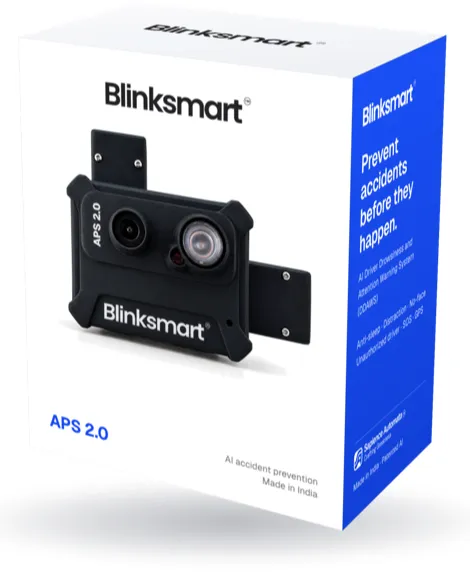
- Blinksmart camera deviceWatches the driver, runs the AI and sounds the alarm
- GPS moduleLocation, speed and trip route
- Modem and SIMSends alerts to your dashboard over mobile data
- DC converterConverts vehicle power for the system
- Wiring harnessBrings power from the vehicle to the device
A SIM with an active data plan and mounting hardware are fitted by our installer.
One visit per site. Fit, test, train.
How we deploy, step by stepPrepare
We agree the vehicles, routes and depot, book a date, set up your fleet account and collect the driver list.
Survey and install
Each vehicle's power point, camera position, GPS and modem location is checked, then everything is fitted in a fixed order.
Bring online and QC
Every vehicle is registered and its drivers authorised, then it must pass a 9-point check before we leave.
Train and sign off
Every driver is trained, your managers learn the daily routine, and you sign the handover sheet.
Support and warranty
Basic checks first, then a partner visit, then Blinksmart support. Replacements are approved after inspection.
Covered
- Manufacturing defects in the device or hardware
- Hardware failure in normal use, with no damage or tampering
- Functional failure of supplied parts, after inspection
- Software or firmware issues in the supplied system
Not covered, may be chargeable
- Covering, tilting or moving the camera
- Substances on the lens, or damage from unsuitable cleaning
- Impact, breakage, cutting, water or unauthorised opening
- Unauthorised repair, wiring or installation changes
- Wrong power supply or improper electrical connection
A NoFace alert or an inactive status alone does not mean the device is faulty. Final eligibility is decided after technical inspection, under your purchase order or service agreement.
Questions fleet owners ask
How is Blinksmart different from a fleet dashcam?
Most fleet cameras record events so someone can review them after the trip. Blinksmart runs its AI on the device in the cab. It sounds an alarm the moment it detects microsleep, looking down or yawning, and sends Critical events to the fleet manager's dashboard while the vehicle is still on the road.
Is CoPilot AI included with Blinksmart?
Yes. CoPilot AI is the detection software that runs inside every Blinksmart device.
Does Blinksmart work across vehicle types?
Yes. The camera mounts on the dashboard or A-pillar of buses, trucks and other commercial vehicles, angled at the driver's face. Our installer surveys each vehicle's power point, camera position, GPS and modem location before fitting anything.
How does Blinksmart predict a dangerous moment?
It watches for early signs of fatigue, such as yawning, and logs them as warnings for coaching. When sleep or looking-down events repeat on the same vehicle (5 times in a rolling 15 minutes), it raises a Critical alert so the manager can call the driver and ask them to stop and rest.
Does it work at night?
Yes. Blinksmart uses infrared cameras, so it can see the driver's eyes in a dark cab through the whole night shift.
What if a driver covers the camera?
The dashboard raises a NoFace alert straight away, and NoFace is one of the five Critical alerts. The manager calls the driver to clear the lens. Every driver is trained on this at installation, and tampering is not covered by the warranty.
What happens when there is no mobile network?
Detection and the in-cab alarm run on the device, so they keep working without signal. The device stores its data and sends it when the network returns, so the dashboard can briefly show an older status.
How is driver data handled?
Event images and driver photos are personal data. Every authorised user gets their own login, and we help you limit access to the people who need it. Our team can walk your IT staff through how data travels from the cab to the dashboard.
See it on your own buses.
Tell us about your fleet and we'll arrange a demo at your depot.
Book a demo